In short
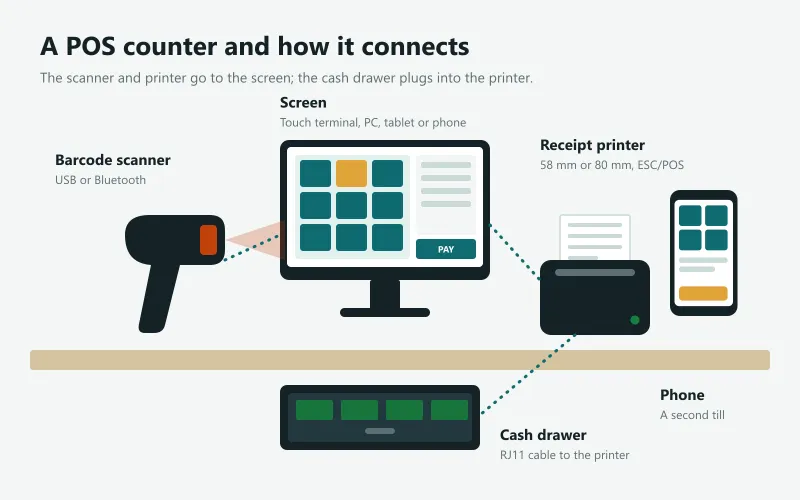
- A POS counter is built from up to six devices: a screen to sell on, a receipt printer, a barcode scanner, a cash drawer, a customer display and, for some shops, a label printer or weighing scale.
- Only the screen is essential. A browser-based POS runs on a computer, tablet or phone you already own; add the other devices as the queue grows.
- Buy a thermal receipt printer that speaks ESC/POS: 58 mm for a small or mobile counter, 80 mm for a busy one. The cash drawer plugs into the printer and opens when a receipt prints.
- Before buying, check that the POS software supports the exact printer model and connection (USB, Bluetooth or network) on the device you will use.
The six POS devices and what each one does
| Device | What it does | Do you need it? |
|---|---|---|
| Screen (touch terminal, PC, laptop, tablet or phone) | Runs the POS software: sell, take payments, see reports | Yes |
| Thermal receipt printer | Prints receipts and kitchen tickets; opens the cash drawer | Most shops |
| Barcode scanner | Reads product barcodes in a fraction of a second | Shops with many packaged items |
| Cash drawer | Keeps cash locked; opens on each cash sale | Shops taking cash |
| Customer display | Shows the customer the items and total | Busy counters, supermarkets |
| Label printer, weighing scale | Prints barcode and price labels; weighs loose goods | Groceries, bakeries, hardware |
The screen: touch terminal, laptop, tablet or phone
The screen is where the cashier works, so it should be quick to tap and easy to read in a bright shop. A touch POS terminal (an all-in-one PC with a touch screen, often a Core i3 or i5 with 4 to 8 GB of memory and an SSD) is the classic counter machine; it costs roughly Rs 60,000 to Rs 150,000 in Sri Lanka. A laptop or desktop PC you already own works just as well with a mouse or a small touch monitor. A tablet or phone is ideal for a small counter, a market stall, a delivery or taking orders at tables.
If your POS runs in a web browser (like Sevo Biz App), any of these works, and you can mix them: a terminal at the main counter and a phone for the second counter on a busy day. Dual-screen terminals can show a customer display on the second screen.
Receipt printers: thermal, 58 mm or 80 mm, USB or Bluetooth
Almost every shop uses a thermal receipt printer: it prints with heat on special paper, so there is no ink or ribbon to buy, and it is fast and quiet. The two things to choose are the paper width and the connection.
| 58 mm (2 inch) | 80 mm (3 inch) | |
|---|---|---|
| Printed width | About 48 mm | About 72 mm |
| Best for | Small counters, mobile sales, takeaway | Supermarkets, restaurants, busy counters |
| Size | Small, often battery powered | Larger, mains powered, auto paper cutter |
| Typical price in Sri Lanka | Rs 12,000 to Rs 20,000 | Rs 15,000 to Rs 35,000 |
- USB: the simplest and most reliable for a fixed counter computer.
- Bluetooth: prints from a phone or tablet without cables; check the printer works with your phone (Android and iPhone handle Bluetooth printers differently).
- Network (LAN or Wi-Fi): several tills or the kitchen can share one printer.
Look for printers that support the ESC/POS command set, the common language of receipt printers. It lets the POS cut the paper, print a logo or QR code and open the cash drawer. If you sell with Sinhala or Tamil product names, test them on the printer before buying: printers that only know Latin letters print them correctly only if the POS sends the text as an image.
Barcode scanners
A barcode scanner reads a product's code instantly and adds it to the sale, which is much faster and more accurate than searching by name. 1D scanners read the familiar striped barcodes (EAN-13, UPC, Code 128); 2D scanners also read QR codes and codes on phone screens. Most USB scanners behave like a keyboard: they type the code and press Enter, so they work with any POS without setup. A good 1D and 2D scanner costs about Rs 6,000 to Rs 15,000.
No scanner yet? Many POS systems can use the phone or tablet camera as a scanner. It is slower for long queues but perfect to start with or to count stock.
Cash drawers
A cash drawer locks the cash away and opens only when needed. Most connect to the receipt printer with an RJ11 (telephone-style) cable, not to the computer: when the POS prints a cash receipt, the printer sends a small pulse that opens the drawer. Check the drawer's voltage (usually 24 V) matches the printer, and choose the number of note and coin slots for your currency (Sri Lankan shops often want 4 or 5 note slots and 8 coin slots). Typical price: Rs 10,000 to Rs 20,000.
Customer displays, label printers and scales
- Customer display: shows each item and the total to the customer, which builds trust and cuts arguments at the counter. A dual-screen terminal, a second monitor or even a phone can be the display.
- Label printer: prints barcode and price labels for items that arrive without a barcode, and shelf labels.
- Weighing scale with label printing: for vegetables, meat, bakery and loose goods. The scale prints a barcode with the weight or price inside, and the POS reads it like any other barcode.
What to buy first on a small budget
- Start with what you have: a laptop, tablet or phone running a browser-based POS.
- Add a thermal receipt printer (about Rs 14,000): customers expect a receipt.
- Add a barcode scanner (about Rs 10,000) once you sell many packaged goods.
- Add a cash drawer (about Rs 13,500) when the cash in a tray becomes a risk.
- Upgrade to a touch terminal when the counter is busy all day.
POS hardware from Sevo
If you use Sevo Biz App, you can order tested hardware with your plan from the pricing page or from inside the app (November 2026 prices): a 1D and 2D barcode scanner Rs 10,000 (6 months warranty), a Bluetooth 58 mm thermal printer that also prints from phones Rs 14,000, a cash drawer Rs 13,500, a Core i5 touch POS terminal Rs 140,000 and the all-in-one counter package Rs 175,000 (12 months warranty each). See pricing and hardware.
Questions and answers
What hardware do I need for a POS system?
Only a screen is essential: a computer, tablet or phone that runs the POS. Most shops add a thermal receipt printer, a barcode scanner and a cash drawer. Supermarkets and restaurants may add a customer display, a label printer or a kitchen printer.
Should I buy a 58 mm or an 80 mm receipt printer?
Choose 58 mm for a small, mobile or low-volume counter and 80 mm for a busy shop, supermarket or restaurant. 80 mm receipts are easier to read and usually come with an automatic paper cutter.
How does the cash drawer open?
Most cash drawers plug into the receipt printer with an RJ11 cable. When the POS prints a cash receipt, the printer sends a pulse that opens the drawer. A manager can usually open it without a sale too, which a good POS records.
Can I use my phone as a POS?
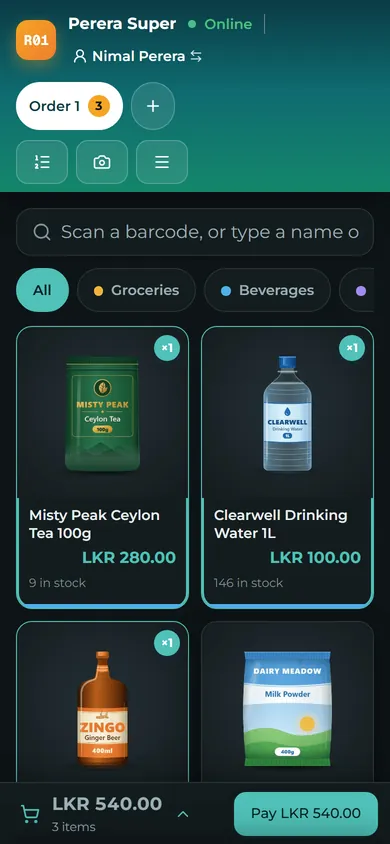
Yes. A browser-based POS such as Sevo Biz App works on a phone, including scanning barcodes with the camera and printing to a Bluetooth printer.
Is a POS machine the same as a card machine?
No. A POS system (software and counter hardware) records the sale. A card machine (card terminal) is supplied by a bank or payment company and takes the card payment. The POS records that the sale was paid by card.