In short
- A POS should record every payment method separately (cash, card, QR, credit account, gift card), allow one bill to be paid in several ways, and give a daily report that matches the drawer and the bank.
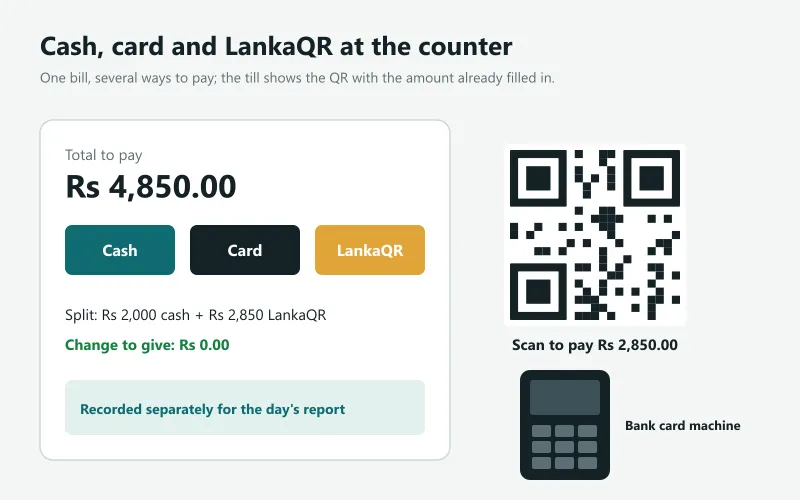
- LankaQR is Sri Lanka's national QR payment standard from the Central Bank: customers pay from their banking or wallet app by scanning the shop's QR. A good POS shows the QR with the amount already filled in.
- Card payments are approved by a card machine from your bank or a payment company; the POS records the sale as paid by card next to it.
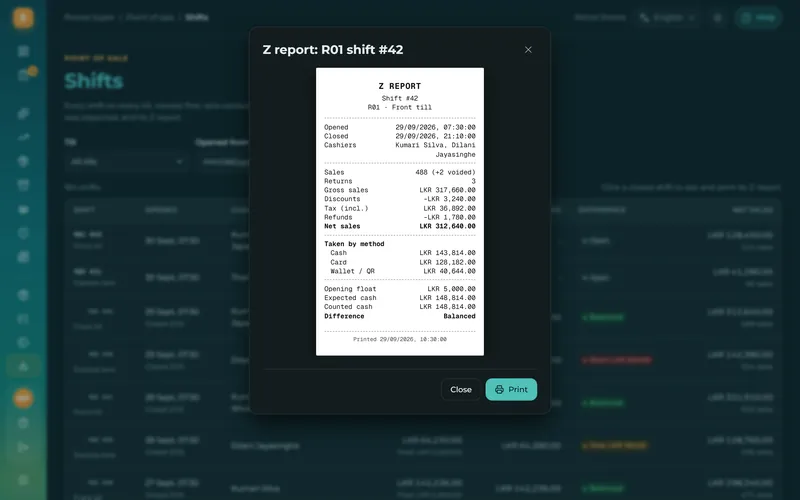
- Close every shift with a count: expected cash (opening float + cash sales - cash refunds - paid-outs) against counted cash, with the difference recorded.
Cash: change, float and the drawer
Cash is still the most common payment in many shops. The POS should show the change to give as soon as the amount tendered is typed (with quick buttons for Rs 1,000 and Rs 5,000 notes), open the cash drawer for cash sales only, and keep track of the float (the change money in the drawer at opening) and any money paid out of the drawer during the day for a delivery, a daily wage or a small bill.
LankaQR: QR payments in Sri Lanka
LankaQR is the national QR code standard of the Central Bank of Sri Lanka, based on the international EMVCo QR specification. A shop gets a LankaQR code from its bank; the customer scans it with any participating banking or payment app and the money goes to the shop's account. One code works with many apps, which is why it has become so common at counters across the country.
There are two ways to use it at a POS. With a static QR (the printed sticker), the customer types the amount, which invites mistakes. With a dynamic QR, the POS shows the shop's QR code with the exact amount of the bill already inside, so the customer only confirms. Either way, the POS should record the sale as paid by LankaQR, so the cash count and the bank statement each match their own total. Ask your bank about the merchant fee for QR payments; it is usually lower than for cards.
Cards: the POS and the card machine
A card payment is approved by a card machine (card terminal), supplied by your bank or a payment company with its own fee per transaction. In most small shops the POS and the card machine are separate: the cashier types the amount on the card machine, the customer taps or inserts the card, and the POS records the sale as paid by card (some POS systems let you note the approval code). At the end of the day the card total in the POS should match the card machine's settlement report.
Split payments
Customers often pay part in cash and part by card or QR, or use a gift card and pay the rest. The POS should accept several payment lines on one bill, show what is still to pay, and record each method separately for the reports.
Credit accounts, layaway and gift cards
- Customer accounts (credit): trusted customers buy now and pay at the end of the month, with a limit and a statement. Common in neighbourhood shops and hardware stores.
- Layaway (pay in parts): the customer pays a deposit, the item is put aside and collected after the last payment.
- Gift cards and store credit: sold or given at the counter, spent later, with the balance always known.
Closing the day: expected cash vs counted cash
| Item | Example (Rs) |
|---|---|
| Opening float | 5,000 |
| + Cash sales | 48,750 |
| - Cash refunds | 1,200 |
| - Paid out (lorry, daily wage) | 3,500 |
| = Expected cash | 49,050 |
| Counted cash | 49,000 |
| Difference (short) | -50 |
The closing report (often called the Z report) lists sales by payment method, refunds, discounts, paid-outs and the cash difference. Card and LankaQR totals are checked against the card machine and the bank, cash against the count. A difference every day is a signal; a good POS shows who was on the till.
Payments in Sevo Biz App
The Sevo till takes cash with the change shown, card (recorded next to your bank's card machine), LankaQR with the amount added to your shop's own LankaQR code on the screen, split payments, gift cards, customer accounts with limits and layaway. Money paid out of the drawer is recorded with what it was for and who allowed it, a salary advance paid from the drawer is taken back from that person's salary by payroll, and the Z report shows the expected and counted cash. Everything goes into the accounts automatically. Try it free for 14 days.
Questions and answers
What is LankaQR?
LankaQR is the national QR code payment standard of the Central Bank of Sri Lanka. Customers pay by scanning the shop's QR code with a participating banking or wallet app, and the money goes to the shop's bank account.
Can a POS show a LankaQR code with the amount?
Yes. A POS can add the bill amount to the shop's LankaQR code (a dynamic QR), so the customer only scans and confirms. Sevo Biz App does this on the payment screen.
Does a POS process card payments itself?
Usually not. Card payments are approved by a card machine from a bank or payment company; the POS records the sale as paid by card so the reports and the drawer count are right.
What is a Z report?
A Z report is the end-of-shift or end-of-day report of a POS: sales by payment method, refunds, discounts, money paid out and the difference between the expected and counted cash.
Can customers pay part cash and part card?
Yes, a good POS accepts several payment methods on one bill (split payment) and records each separately.