In short
- A POS (point of sale) system is the software and hardware a shop uses to sell: it rings up items, takes cash, card or QR payments, prints receipts and keeps stock and sales records up to date.
- For a shop in Sri Lanka, the five things that matter most are: it keeps selling when the power or internet goes, it works in Sinhala, Tamil and English, it handles VAT correctly if you are registered, it accepts LankaQR and cards, and someone local answers when you call.
- Expect to pay either a one-time licence (often Rs 40,000 to Rs 100,000 or more, plus updates) or a monthly subscription (from under Rs 1,000 to over Rs 10,000 a month), plus hardware from about Rs 10,000 for a scanner to Rs 150,000 or more for a full touch terminal.
- Try before you buy: use a free trial for a week with your real products, your real printer and your busiest hour.
What is a POS system?
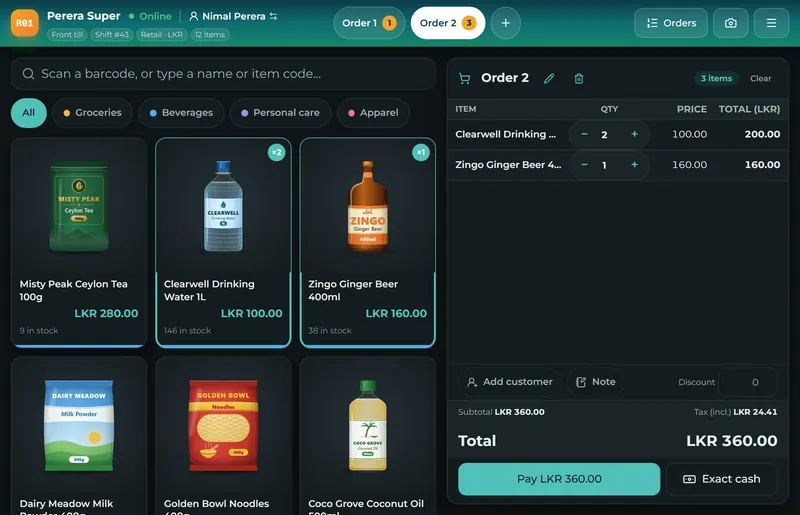
A POS system (point of sale system) is what replaces the cash book, the calculator and the receipt book at the counter. The cashier finds each item by tapping it, typing its name or scanning its barcode; the POS adds the prices, applies any discount and the tax, takes the payment and prints or sends a receipt. Every sale updates the stock count and the day's takings at the same moment, so the owner can see what sold, what is running low and how much cash should be in the drawer, without counting by hand.
A POS system has two halves. The software does the thinking: products and prices, sales, receipts, stock, reports and the people allowed to use it. The hardware is what you touch: a screen (a touch PC, a laptop, a tablet or even a phone), a receipt printer, a barcode scanner and a cash drawer. Many shops start with the hardware they already have and add the rest later; see our POS hardware guide.
Why a Sri Lankan shop needs more than a basic billing app
Most POS systems are designed for countries where the power and the internet are always on and everyone reads English. A shop in Kandy, Jaffna or Matara has different days. These are the five requirements that separate a POS that works here from one that only looks good in a demo.
1. It keeps selling when the power or internet goes
Power cuts and mobile data that drops in the middle of a sale are part of business in Sri Lanka. A POS that needs the internet for every sale stops the queue the moment the connection goes. An offline POS keeps selling, printing and taking payments from the device's own memory, then sends everything to the cloud when the connection returns, without duplicates. Ask every vendor to show this live: switch off the Wi-Fi in the middle of a sale. Our offline POS guide explains what to look for.
2. It speaks Sinhala, Tamil and English
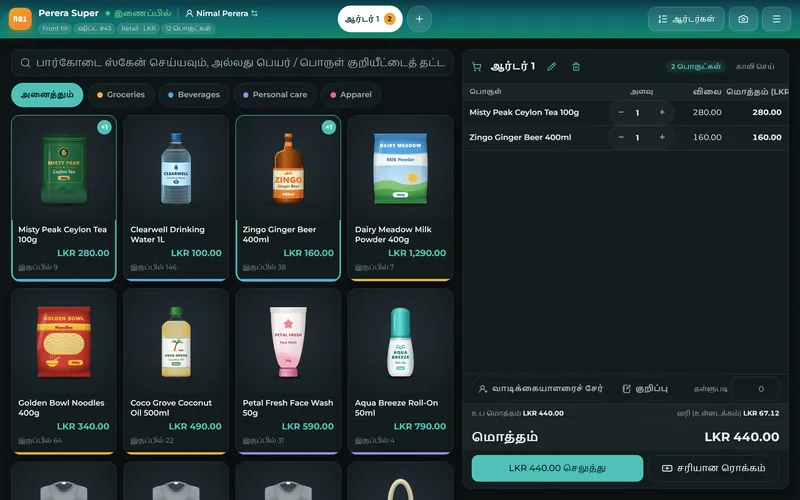
Cashiers learn a till faster in the language they think in, and many customers prefer a receipt they can read. A good POS lets each person choose their language on their own device, and prints Sinhala and Tamil product names correctly (not as boxes or question marks), which needs the printer to receive the text as an image or in a supported font. More in POS in Sinhala and Tamil.
3. It handles VAT correctly, if you are registered
VAT in Sri Lanka is 18% (since 1 January 2024). A VAT-registered business must show the tax correctly on its invoices and keep records the Inland Revenue Department (IRD) can check. Your POS should let you set which products are taxed, whether prices include VAT, print the tax on the receipt and give you the VAT totals for your return. The registration threshold has changed more than once recently, so check the current figure on the IRD website or with your accountant rather than relying on an old article.
4. It accepts LankaQR, cards and cash
Customers now pay with LankaQR from their banking apps as often as with cards. The POS should record each payment method separately (so the drawer count is right), allow a bill to be split between cash and card, and ideally show a LankaQR code with the amount already filled in. Card machines usually come from your bank; the POS records the card payment next to them. See card, LankaQR and cash at the POS.
5. Local help when something goes wrong
A POS is only as good as the help you get at 7 pm on a Saturday. Ask who answers, in which language, on which channel (WhatsApp is the norm here) and how quickly. A help centre with step-by-step guides in your language saves many calls.
The features that matter, by type of business
| Business | Must have | Good to have |
|---|---|---|
| Grocery, supermarket | Barcode scanning, fast search, stock, expiry dates, weighing-scale labels | Supplier orders, reorder suggestions, loyalty points |
| Hardware shop | Large product lists, units and packs, customer credit accounts, quotations | Delivery notes, orders taken over the phone |
| Pharmacy | Batches and expiry dates, fast search by name | Reorder suggestions, supplier returns |
| Clothing, fashion | Sizes and colours, exchanges and returns | Loyalty, offers, online shop |
| Mobile and electronics | Serial or IMEI numbers, warranty, repairs | Layaway (pay in parts), trade-ins |
| Restaurant, café, bakery | Tables, kitchen order tickets, service charge, split bills | Kitchen screen, recipes and food cost |
If you run more than one of these (a grocery with a bakery counter, a hardware shop that repairs pumps), choose a POS that does both well rather than two systems that do not talk to each other. Detailed guides: restaurant POS and supermarket and grocery POS.
What a POS system costs in Sri Lanka
There are two ways to pay for the software. A one-time licence is paid once (Sri Lankan vendors advertise roughly Rs 40,000 to Rs 100,000 and more), and you usually pay again for updates, support or a cloud add-on. A subscription is paid monthly or yearly (from under Rs 1,000 to more than Rs 10,000 a month) and includes updates, backups and support. Over five years the totals can be closer than they look, so compare the whole cost, not the first payment. The full breakdown with hardware prices is in POS system price in Sri Lanka.
Cloud, desktop or both?
A desktop POS lives on one computer in the shop: it works without the internet, but the owner cannot see sales from home, and a broken hard disk can lose everything. A cloud POS keeps the data online: you can check sales from anywhere and nothing is lost if a device breaks, but a cloud-only system stops when the internet does. The best of both is a cloud POS that also works offline. Read cloud POS vs desktop POS before you decide.
How to choose: a seven-step checklist
- Write down how you sell today: how many counters, how many items, busiest hour, who uses the till, which payments you take.
- List your must-haves from the table above, and the two or three reports you want every evening.
- Shortlist three systems and ask each for the full five-year cost, including hardware, updates and support.
- Test offline: in the demo, switch off the internet in the middle of a sale and keep selling.
- Test your language and printer: print a receipt with a Sinhala or Tamil product name on your own printer.
- Run a free trial with your real products for a week, including your busiest hour and the closing count.
- Check how you leave: can you export your products, customers and sales if you change system later?
A longer, country-neutral version of this checklist is in how to choose a POS system for a small business.
How Sevo Biz App fits
Sevo Biz App is a Sri Lankan cloud POS and business system built for exactly these conditions. The till keeps selling, printing and taking payments with the internet or the power off and sends everything later; every screen and receipt works in Sinhala, Tamil and English; VAT, LankaQR (with the amount on the screen), cards, cash and split payments are built in; and stock, purchasing, accounts, staff and payroll are in the same system, so the sale you ring up is already in your books.
Plans start at Rs 900 a month for one shop and one till (Starter), Rs 2,900 for up to three shops and three tills with restaurant mode, the online shop, HR and payroll (Growth) and Rs 5,900 for up to ten branches (Business). Every feature is free for 14 days with no card needed. See pricing or start a free trial.
Questions and answers
Is a POS system the same as billing software?
In Sri Lanka the words are often used for the same thing. Billing software prints bills; a POS system also takes payments, opens the cash drawer, keeps stock and customers up to date and gives the day's reports. Sevo Biz App does all of that, including the bill.
What is the best POS system in Sri Lanka?
There is no single best POS for every shop. The best one for you keeps selling when the power or internet goes, works in the language your staff use, handles VAT and LankaQR, fits the way your business sells (retail, restaurant, pharmacy) and has local support. Shortlist three, test them offline with your own products, and compare the five-year cost.
How much does a POS system cost in Sri Lanka?
Software is either a one-time licence (often Rs 40,000 to Rs 100,000 or more) or a subscription (from under Rs 1,000 to over Rs 10,000 a month). Hardware ranges from about Rs 10,000 for a barcode scanner and Rs 15,000 for a receipt printer to Rs 140,000 or more for a touch POS terminal. Sevo Biz App starts at Rs 900 a month.
Can a POS system work without the internet?
Some can and some cannot. An offline-capable POS stores sales on the device while the connection is down and sends them when it returns. Always test this in the demo by switching off the Wi-Fi in the middle of a sale.
Do I need special hardware for a POS?
No. Many POS systems, including Sevo Biz App, run in a web browser on a computer, tablet or phone you already have. A receipt printer, a barcode scanner and a cash drawer make the counter faster and can be added one at a time.
Does a POS help with VAT in Sri Lanka?
A good one does: it marks which products are taxed, shows VAT on the receipt and totals the VAT you collected for your return. VAT is 18% since January 2024; check the current registration threshold with the IRD or your accountant.
Is there a POS system in Sinhala and Tamil?
Yes. Sevo Biz App works fully in Sinhala, Tamil and English, including printed receipts, and each user picks their own language.