In short
- Cashiers learn a POS faster and make fewer mistakes in the language they think in; many customers also prefer a receipt in their own language.
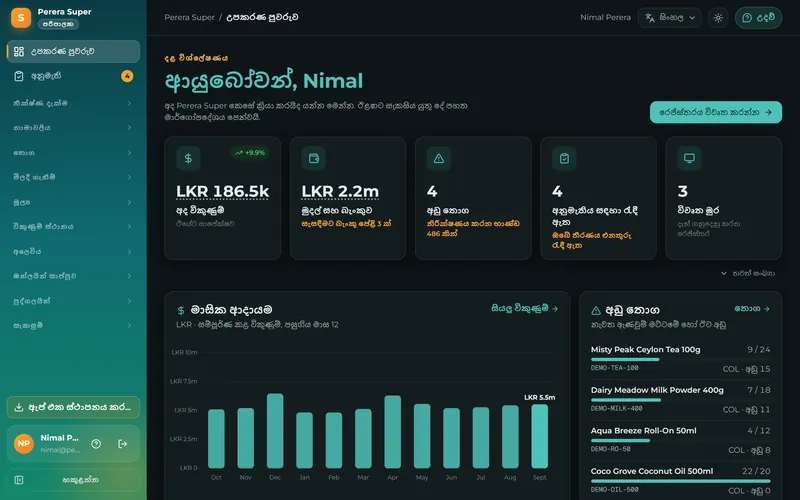
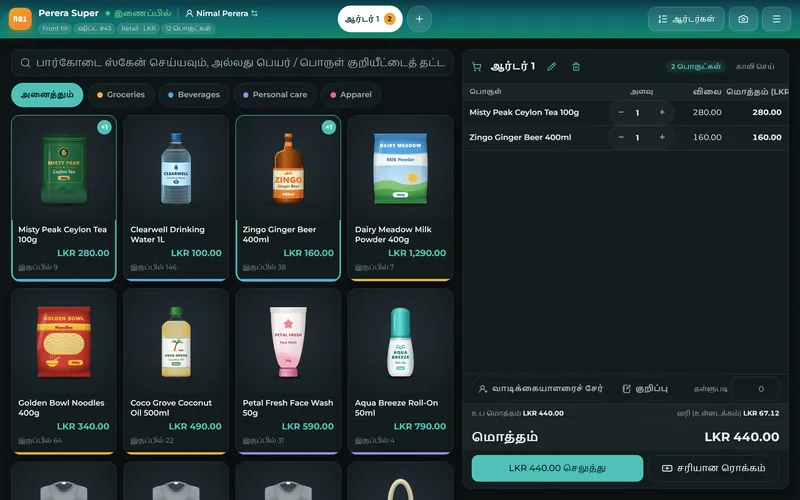
- Look for a POS where each user chooses Sinhala, Tamil or English, product names can be written in any of them, and receipts print the letters correctly on your printer.
- Moving from a cash book or Excel takes about a week: import your products, set prices and taxes, connect the printer, train for a day, run both side by side for two days, then switch.
- Keep the paper book for one more week as a fallback, and count the stock once on the first Sunday.
Why the language of the till matters
A till is used hundreds of times a day, often by staff who are new, under pressure and serving a queue. When the buttons, messages and warnings are in the cashier's own language, they find things faster, ask for help less and make fewer mistakes. For the owner, reports in their own language are reports they actually read. In Sri Lanka that means Sinhala, Tamil and English, and different people in the same shop may want different ones.
What to check in a Sinhala and Tamil POS
- Every screen is translated, not just the menu: messages, errors, reports and help.
- Each user chooses their language on their own device, without changing it for everyone.
- Product names can be typed in Sinhala or Tamil (and searched).
- Receipts print the letters correctly. Many receipt printers only know Latin letters; Sinhala and Tamil then print as boxes or question marks unless the POS sends the text as an image. Test on your own printer.
- Help guides are available in the language, so staff can learn without calling.
Moving from the cash book to a POS: the seven-day plan
| Day | What to do |
|---|---|
| Day 1 | List your products in a spreadsheet: name, barcode (if any), selling price, cost, category. Start with the 100 that sell most. |
| Day 2 | Import the list into the POS. Set taxes (VAT if registered), your shop details and the receipt header and footer. |
| Day 3 | Connect the receipt printer, scanner and cash drawer. Print a test receipt with a Sinhala or Tamil name. |
| Day 4 | Train staff for an hour each: a sale, a return, a discount, a split payment, the end-of-day count. Give each a PIN. |
| Day 5 and 6 | Run the POS beside the cash book. Compare the totals at closing; fix prices and missing items. |
| Day 7 | Switch: the POS is the record. Count the stock and enter the opening quantities. |
Common worries, answered
- "My staff are not good with computers." A till with big buttons in their own language, photos on the product tiles and a PIN to sign in is easier than the cash book within a day.
- "What if the internet goes?" Choose a POS that works offline. See offline POS.
- "It will take months to enter my products." Import them from a spreadsheet; start with the top 100.
- "It is too expensive." A browser POS on a device you own costs less than one lost day of sales a month. See POS prices.
Sevo Biz App in Sinhala, Tamil and English
Sevo Biz App is fully translated into Sinhala, Tamil and English: the till, the back office, the reports, the receipts and the help centre. Each person picks their own language, product names can be in any of the three, and receipts print Sinhala and Tamil correctly on 57/58 mm and 80 mm thermal printers. Products import from a spreadsheet with a ready template, and a sample shop shows how everything works before you add your own. Start the 14-day free trial or read the help centre.
Questions and answers
Is there a POS system in Sinhala?
Yes. Sevo Biz App works fully in Sinhala, including the till, reports, receipts and help guides, and each user can choose Sinhala, Tamil or English.
Is there a POS system in Tamil?
Yes. Sevo Biz App works fully in Tamil as well as Sinhala and English, and prints Tamil product names correctly on receipts.
Why does my receipt printer print Sinhala as boxes?
Most receipt printers have only Latin letters built in. To print Sinhala or Tamil, the POS has to send the text as an image or use a printer with those fonts. Sevo Biz App prints Sinhala and Tamil correctly on ordinary thermal printers.
How long does it take to switch from a cash book to a POS?
About a week: a day to list products, a day to import and set up, a day for hardware, a day for training, two days side by side with the cash book, then switch.