In short
- An offline POS is a point of sale that keeps ringing up sales, taking payments and printing receipts when the internet is down, and sends everything to the cloud when the connection returns.
- It matters wherever connections are unreliable: in Sri Lanka, power cuts and dropped mobile data are common, and a POS that stops costs you the customers in the queue.
- Good offline POS systems store the products, prices and customers on the device, give every sale a unique number so nothing is counted twice, and show clearly how many sales are waiting to be sent.
- Test it yourself: switch off the Wi-Fi in the middle of a sale, keep selling, close the browser, reopen it, then switch the Wi-Fi back on and check every sale arrived exactly once.
What is an offline POS?
An offline POS is a point of sale system that does not need an internet connection to sell. The products, prices, taxes and customers are kept on the device itself; each sale is saved there first and sent to the cloud as soon as a connection is available. To the cashier and the customer nothing changes: the sale goes through, the receipt prints and the drawer opens.
This is different from a cloud-only POS, which sends every tap to a server and stops when the connection does, and from an old desktop POS, which works offline but keeps the data on one computer, so the owner cannot see it from home and a broken disk can lose it.
Why offline matters (especially in Sri Lanka)
- Power cuts: a laptop or a phone keeps running on its battery; the router and the fibre box usually do not.
- Mobile data drops: many shops sell on 4G, which slows or drops at the busiest times.
- Queues do not wait: a till that freezes for two minutes at 6 pm loses the customers who walk out.
- Markets, events and deliveries: selling where there is no reliable signal at all.
How a good offline POS works
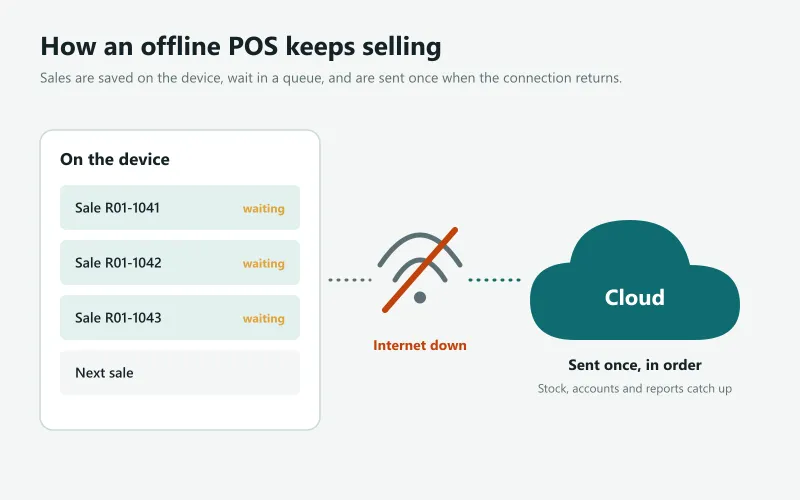
- Everything needed to sell is on the device: products, prices, offers, taxes, customers and the cashier PINs are downloaded while online and kept up to date.
- Each sale gets a unique number on the device, so if the same sale is sent twice (a common thing on a weak connection) the server keeps it once.
- Sales wait in a queue that survives closing the browser or restarting the device.
- When the connection returns, the queue is sent in order, and stock, accounts and reports catch up.
- The screen shows the state (online, offline, number of sales waiting), so nobody switches off a device with unsent sales.
What should keep working offline
| Task | Should work offline? |
|---|---|
| Find products by tap, name or barcode | Yes |
| Discounts, offers and taxes | Yes |
| Cash, card and split payments | Yes (the card machine needs its own connection) |
| Print the receipt and open the drawer | Yes |
| Returns and voids | Yes, checked again when online |
| Cashier sign-in with a PIN | Yes |
| Close the shift and print the Z report | Ideally yes |
| See today's sales from home | No: they arrive when the shop reconnects |
The five-minute offline test
Do this in any demo or free trial before you buy. It shows in five minutes whether a POS really works offline or only says so.
- Start a sale with three items.
- Switch off the Wi-Fi (or unplug the router) and finish the sale. Take cash, print the receipt.
- Ring up two more sales, one with a discount and one paid by card.
- Close the browser or the app completely, then open it again: the sales must still be waiting.
- Switch the Wi-Fi back on and check the back office: three sales, each once, with the right stock and totals.
Offline selling in Sevo Biz App
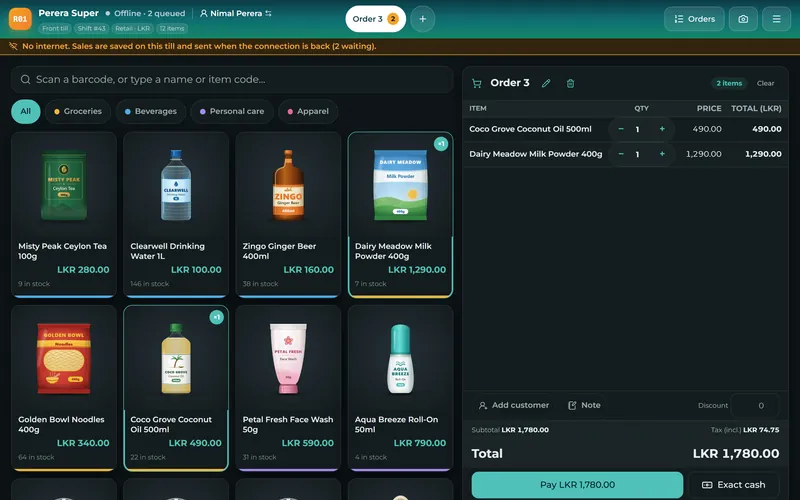
The Sevo till was built for Sri Lankan power and internet cuts. Products, prices, offers, customers and cashier PINs live on the device; sales, returns, new customers, shift openings and closings, paid-outs, drawer openings and staff clock-ins wait in a queue that survives restarts and go up in order, once, when the connection returns. The top bar always shows whether the till is online and how many items are waiting. It runs in the browser on a computer, tablet or phone, and can be installed like an app.
Try the test above yourself: start a 14-day free trial, or read how cloud and desktop POS compare.
Questions and answers
Can a POS system work without the internet?
Yes, if it is built to. An offline POS keeps products and prices on the device, saves each sale there and sends it to the cloud when the connection returns. A cloud-only POS stops working when the internet does.
What happens to sales made offline?
They wait in a queue on the device and are sent automatically when the connection returns. A good POS gives each sale a unique number so nothing is counted twice, and shows how many sales are waiting.
Can I accept card payments offline?
The POS can record a card payment offline, but the bank's card machine needs its own connection (usually its own SIM) to approve the card. Cash and LankaQR shown on the screen can be recorded as usual.
Is an offline POS the same as a desktop POS?
No. A desktop POS keeps all data on one computer. A modern offline POS keeps a working copy on the device and the real records in the cloud, so the owner can see every branch and nothing is lost if a device breaks.
Does Sevo Biz App work offline?
Yes. The Sevo till keeps selling, printing receipts and taking payments without internet, including after a restart, and sends everything when the connection returns.