In short
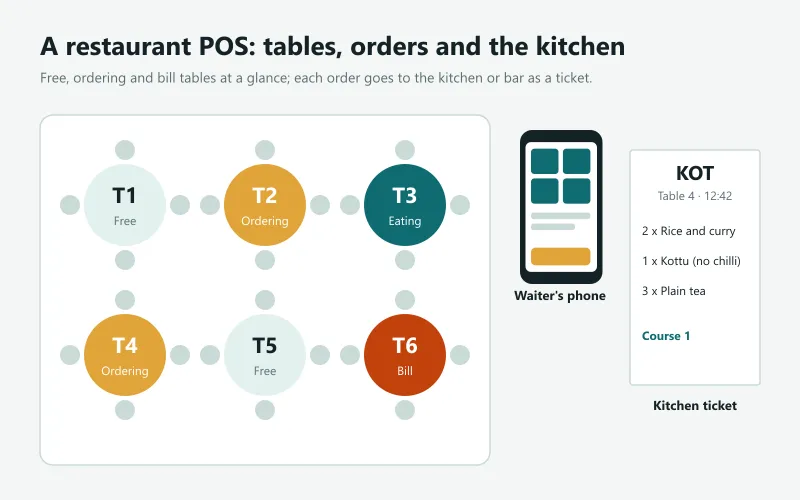
- A restaurant POS adds what a shop till does not have: a floor plan of tables, orders that stay open while people eat, kitchen and bar order tickets (KOT and BOT), courses, a service charge and bills split by item or person.
- In Sri Lanka, the usual extras are a 10% service charge shown separately on the bill, menus in Sinhala, Tamil and English, LankaQR payments and a till that keeps working during power cuts.
- Behind the counter, the best systems also track ingredients: each dish uses its recipe from stock, so you can see food cost and waste, not just sales.
- Choose a POS where several devices (the counter, a waiter's phone, the kitchen) see the same open orders, and test it in a busy hour before you commit.
How a restaurant POS differs from a shop till
In a shop, a sale starts and ends at the counter in a minute. In a restaurant the order is opened at a table, sent to the kitchen in parts, changed while people eat, moved when the party changes tables and paid at the end, sometimes by three people in three ways. A restaurant POS is a till built around that open order: who is sitting where, what has gone to the kitchen, what is still to come and what each person owes.
The restaurant POS checklist
| Feature | Why it matters |
|---|---|
| Tables and areas (floor plan) | See at a glance which tables are free, ordering, eating or waiting for the bill |
| Open orders shared between devices | A waiter's phone and the counter work on the same order |
| Kitchen and bar order tickets (KOT, BOT) | Each station prints only its items, in the kitchen's language |
| Kitchen screen | Cooks see and bump orders on a screen instead of paper |
| Courses | Starters first, mains when the table is ready |
| Add-ons and notes | Extra cheese, no chilli, less sugar, priced correctly |
| Service charge | Added automatically and shown separately on the bill |
| Move, merge and split | Change tables, join two tables, split the bill by item or person |
| Recipes and food cost | Each dish takes its ingredients from stock; see cost and waste |
| Works offline | Orders and bills keep going during a power or internet cut |
Kitchen order tickets: KOT, BOT and the kitchen screen
A KOT (kitchen order ticket) is the slip the kitchen receives when an order is placed; a BOT (bar order ticket) does the same for the bar. A good POS sends each item to the right station automatically, by category: rice and curry to the kitchen, fresh juice to the bar. It prints the table, the time, the waiter, the notes and the course, and prints a clear cancellation when an item is removed, so the kitchen never cooks something nobody ordered.
A kitchen screen (a tablet or monitor in the kitchen) replaces the printed tickets: new orders appear at once, cooks tap them as done and the counter sees what is ready. It saves paper and lost tickets in a busy kitchen.
Service charge in Sri Lanka
Most Sri Lankan restaurants and hotels add a service charge, usually 10% of the bill, shown as a separate line. Your POS should add it automatically for table service (and not for takeaway, if that is your rule), show it clearly on the bill, and report how much was collected so it can be shared with staff as your policy says. If you are VAT-registered, ask your accountant how VAT applies to the service charge in your case, and set the POS accordingly.
Split bills, move tables, merge tables
- Split by item: each person pays for what they ate.
- Split by person: the bill divided equally.
- Split by payment: part cash, part card, part LankaQR.
- Move: the party moves to a bigger table; the order and its kitchen tickets follow.
- Merge: two tables join and pay together.
Recipes, ingredients and food cost
Sales tell you what sold; food cost tells you whether you made money. When each dish has a recipe (200 g rice, 100 g chicken, spices), every sale takes those ingredients from stock. You can then see the cost of each dish, the gross margin of the day, which dishes earn the most, and the waste you record at closing. Purchases of rice, chicken and vegetables go into the same stock, so the numbers close the loop.
Cafés, bakeries and takeaways
A café or bakery counter needs a fast till more than a floor plan: photo tiles, add-ons (extra shot, oat milk), several open orders named by customer, a kitchen or barista ticket, loyalty points and LankaQR. Bakeries also want items made in batches from recipes, and expiry tracking on what goes on the shelf. Choose a POS where table service is a switch you can turn on later.
Restaurant mode in Sevo Biz App
Sevo Biz App has a restaurant mode for any till: areas and tables, open orders shared between devices, kitchen and bar tickets by category (printed or on a kitchen screen), courses, add-ons, a service charge, move, merge and split, and recipes with food cost and waste. A retail till in the same business works exactly as before, so a café with a shop corner uses one system. Like every Sevo till it keeps working offline and speaks Sinhala, Tamil and English. Restaurant mode is in the Growth plan (Rs 2,900 a month) and free to try for 14 days: see pricing. See Sevo for restaurants and cafés.
Questions and answers
What is a KOT in a restaurant?
A KOT (kitchen order ticket) is the ticket the kitchen receives when a waiter places an order, showing the table, the items, notes and the time. A BOT is the same for the bar. A restaurant POS prints or shows them automatically.
What is the usual service charge in Sri Lanka?
Many Sri Lankan restaurants and hotels add a 10% service charge, shown as a separate line on the bill. Your POS should add and report it automatically.
Can a restaurant POS split the bill?
A good one can split by item, by person or by payment method, and move or merge tables while keeping the kitchen tickets with the order.
Do I need a separate POS for a café and a shop?
Not if your POS has a restaurant mode per till. In Sevo Biz App one till can run in restaurant mode while another sells as a shop, with one set of stock and accounts.
Can a restaurant POS work during a power cut?
An offline-capable POS keeps taking orders and bills on a battery-powered device, and syncs when the connection returns. Printers and the kitchen screen need power, so a small UPS for them is a good idea.